


获取单元格的值作为导出文件的名称
需求背景
在润乾报表的默认行为中,通过 JSP 页面导出 Excel 或 PDF 时,文件名取自报表文件本身的名称。若业务要求导出的文件名由报表内容动态决定(例如取报表标题行 A1 单元格的值),需在展示 JSP 中通过 API 预先计算报表并取出目标单元格的值,再将该值赋给 report:html 标签的 saveAsName 属性。
实现原理
润乾报表的 report:html 标签支持 saveAsName 属性,用于指定导出 Excel/PDF 时的文件名(不带扩展名)。该属性的值可以是 JSP 中的变量表达式。
完整代码实现
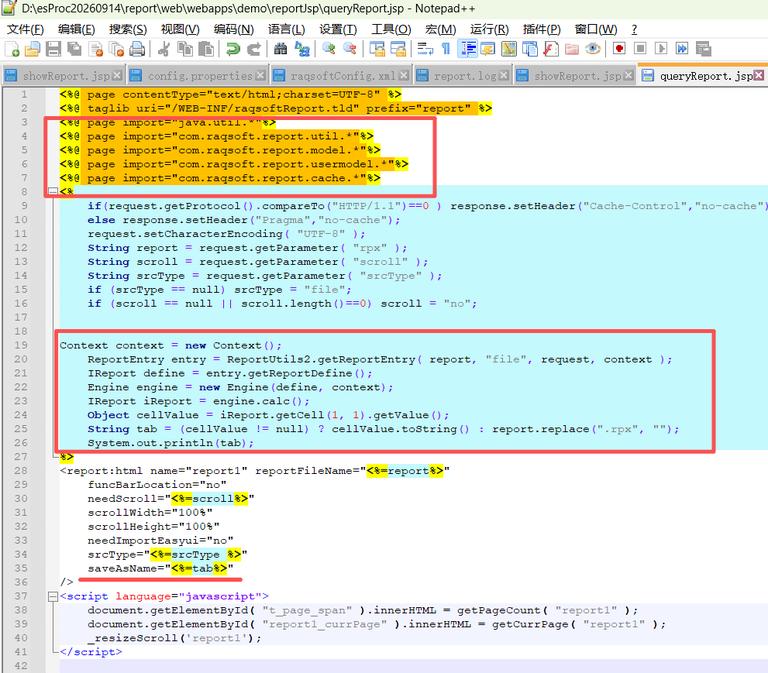
1、在原有的 showReport.jsp 添加依赖导入
<%@ page import=“com.raqsoft.report.model.*”%>
<%@ page import=“com.raqsoft.report.usermodel.*”%>
<%@ page import=“com.raqsoft.report.cache.*”%>
2、加入以下 Java 脚本片段
// 创建上下文并获取报表入口
Context context = new Context();
ReportEntry entry = ReportUtils2.getReportEntry(report, “file”, request, context);
// 获取报表定义并构造引擎
IReport define = entry.getReportDefine();
Engine engine = new Engine(define, context);
// 运算报表
IReport iReport = engine.calc();
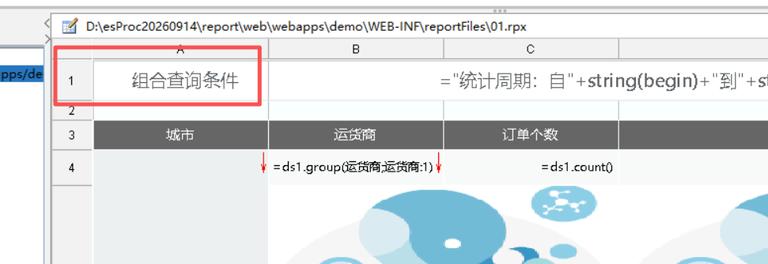
// 取出 A1 单元格的值(行列均从 1 开始)
Object cellValue = iReport.getCell(1, 1).getValue();
// 判断 A1 是否为空,为空显示报表文件名称
String tab = (cellValue != null) ? cellValue.toString(): report.replace(“.rpx”, ““);
// 调试输出
System.out.println(tab);
3. 在 report:html 标签中添加 saveAsName 属性
saveAsName=”<%=tab%>”
至此,页面导出时即以 A1 单元格的值作为文件名。
注意
如果你的报表带有参数模板,需在 queryReport.jsp 中同样添加取 A1 值的逻辑。
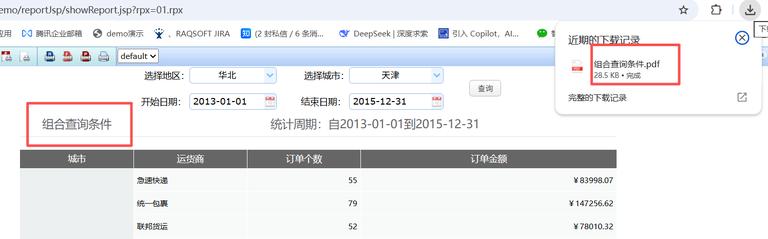
测试效果:
点击导出 pdf 可看到导出名称为 组合查询条件.pdf
可参考以下 jsp